
Oopbuy coupon terms, read from the record itself
Every Oopbuy coupon is a record with a handful of fields. Learn to read them and the title on a coupon stops being a mystery: you can tell which bill it targets, what it needs and when it dies.
One coupon record, field by field
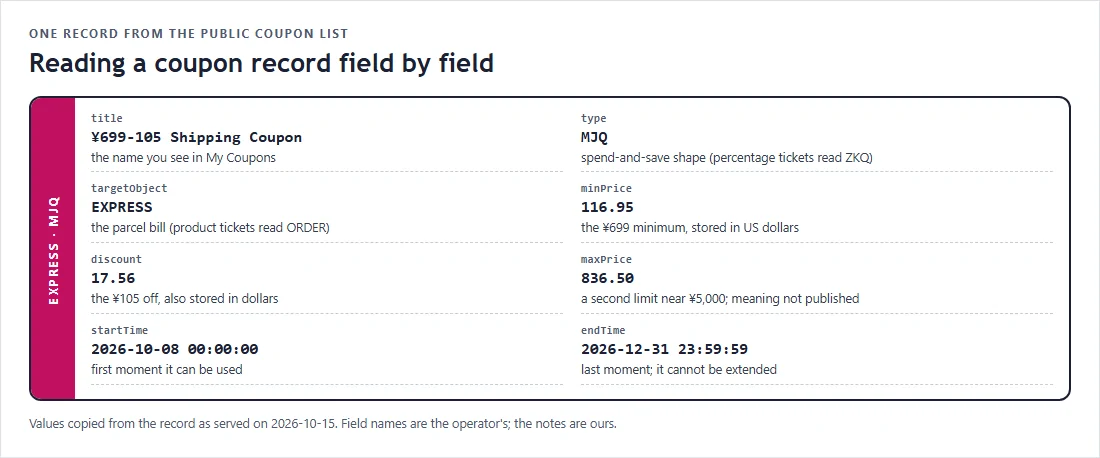
Oopbuy's site loads a public list of coupons from its own interface. Each entry has the same fields. The one shown here is the ¥699-105 shipping coupon from the October ladder; the values are copied exactly as served on 15 October 2026.
Three fields do most of the work: targetObject tells you the bill, type tells you the shape, and startTime and endTime give the window. The rest are limits stored in dollars, which is why they look like odd decimals.
The type field: MJQ and ZKQ
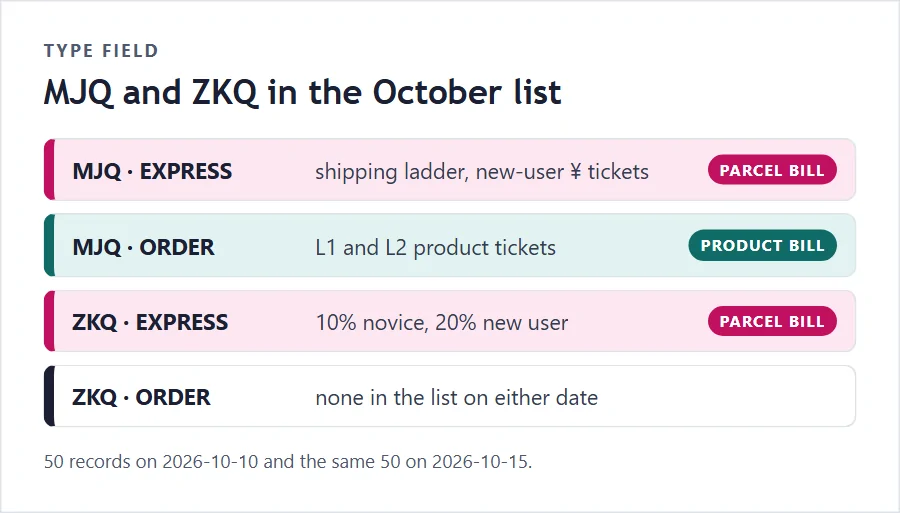
Two values appear in the type field. MJQ marks a spend-and-save coupon: the title reads like ¥999-260 and the record carries both a minimum and an amount off. ZKQ marks a percentage coupon: the title reads like 10% Shipping Coupon and the record's discount field holds a small number (1.0 for ten percent, 2.0 for twenty).
In the October list, spend-and-save tickets exist for both bills, while every percentage ticket targets the parcel bill. Not one ZKQ record targets the product bill. That matches the calendar too: every percentage offer currently advertised is a shipping coupon.
The target field decides the bill
EXPRESS means the parcel bill: the international shipping you pay when the warehouse sends your items. ORDER means the product bill: the item price and freight to the warehouse. In October, 30 records target the parcel bill and 20 the product bill.
This is the single most useful field, and the one the coupon title sometimes leaves out. A ticket called L1 299-15 product coupon says product in its title; a ticket called Over 299-30 discount_729 does not tell you anything, but its target is EXPRESS and its description says New User Exclusive.
If you are ever unsure which bill a coupon in your account will reduce, the title is a hint and the target is the answer. When the account page does not show the target, test it: a parcel coupon will only appear as selectable when you pay for a parcel.
Why the limits are stored in dollars
The title of a coupon is written in yuan, but the minimum, discount and second limit are stored in US dollars. ¥1999 becomes 334.44, ¥299 becomes 50.03, and ¥600 off becomes 100.38. Each pair sits close to the divisor the official shipping estimator uses, about 5.98 yuan to the dollar (5.9756 on both 10 and 15 October 2026).
For you this matters only at the edges. If your parcel bill is displayed in another currency and sits right at a minimum, the comparison is made on converted numbers, and a few cents of rounding can decide whether the ticket applies. Leave a small margin above any minimum.
The second limit nobody explains
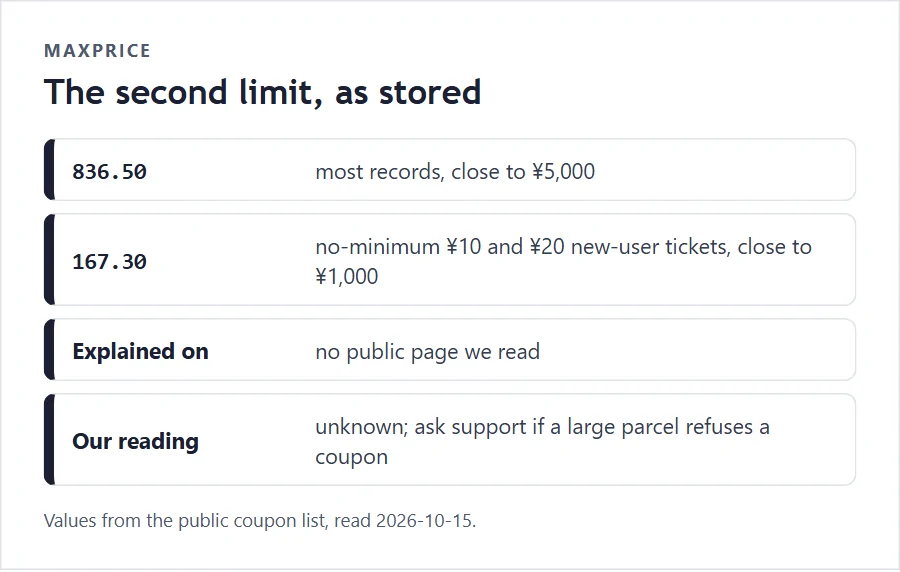
Every record also carries a maxPrice. For most coupons it is 836.50, close to ¥5,000. For the no-minimum ¥10 and ¥20 new-user tickets it is 167.30, close to ¥1,000. The coupon pages, the FAQ and the event rules never mention it.
It may be a cap on the bill a coupon can apply to, or a cap on something else. We do not know, and the operator has not said, so we report the number and leave the meaning open. If you run into a coupon that refuses to apply to a large parcel, this field is the likely reason, and support is the place to ask.
What the coupon FAQ actually says
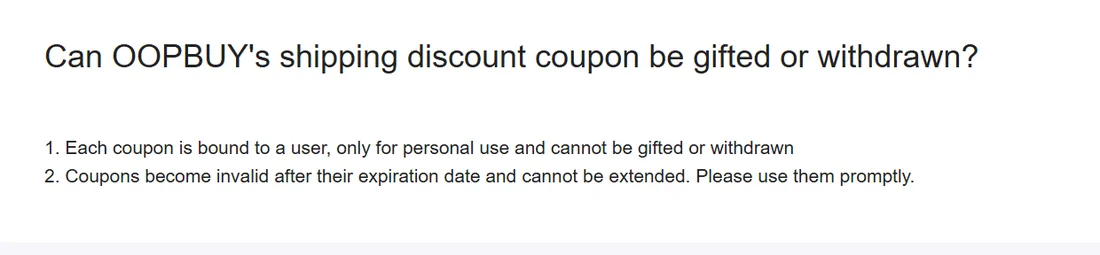
The help centre has three short entries about coupons. One says each coupon is bound to one user, for personal use only, and cannot be gifted or withdrawn, and that coupons become invalid after their expiration date and cannot be extended. A second says shipping coupons come from website activities, from Reddit welfare activities and from Discord events. A third explains where to see them in your account.
That is the complete written rulebook for coupons outside of individual event pages. Everything else (stacking, caps, partial refunds) is either written into one event's rules or not written at all.
Where your coupons appear
Once logged in, open the account homepage and choose My Coupons, or go through My Assets in the left-hand menu and then Coupons. Both paths lead to the same list. The FALL10 calendar card links to the My Coupons page directly.
Check the list after every claim. Coupons from codes, draws and events land there with their own end dates, and those dates can be shorter than the campaign that issued them: lucky-wheel coupons in 2026 lasted 30 days, and a February 2025 spin-to-win issued product coupons valid for only 3 days.
Stacking: what is written and what is not
People ask about stacking more than anything else, and it is the question with the least written answer. No public page we read says whether two coupons can be used on one parcel, whether a product coupon combines with an event price, or whether a code-issued coupon combines with a new-user ticket.
Here is what is written: coupons are bound to the user, cannot be gifted, cannot be withdrawn and cannot be extended. Some event rules add their own conditions; the September ship-and-win event, for instance, counted only parcels submitted and fully paid during the round.
So on this site stacking is always marked not stated. At checkout, the coupon selector will show you what it allows. That is the operator's actual behaviour, and it can change without notice.